
Offer Mercari
The Make Offer feature lets you send your desired price directly to a Mercari seller through Janbox. If the seller accepts your offer, you can purchase the item at a discounted price.
How to Make Offer
Step 1: Search for a Mercari Product
Search for the Mercari item you want to buy on Janbox. You can search by keyword or paste the Mercari product link directly into the search bar.
Step 2: Open the Product Detail Page
Step 3: Tap the "Make Offer" Button
Tap Make Offer below the purchase section to send your offer to the seller.
Step 4: Enter Your Desired Price
In the offer window:
Enter the amount you'd like to offer.
Double-check the price before submitting. It's best to offer a reasonable price to increase your chances of the seller accepting.
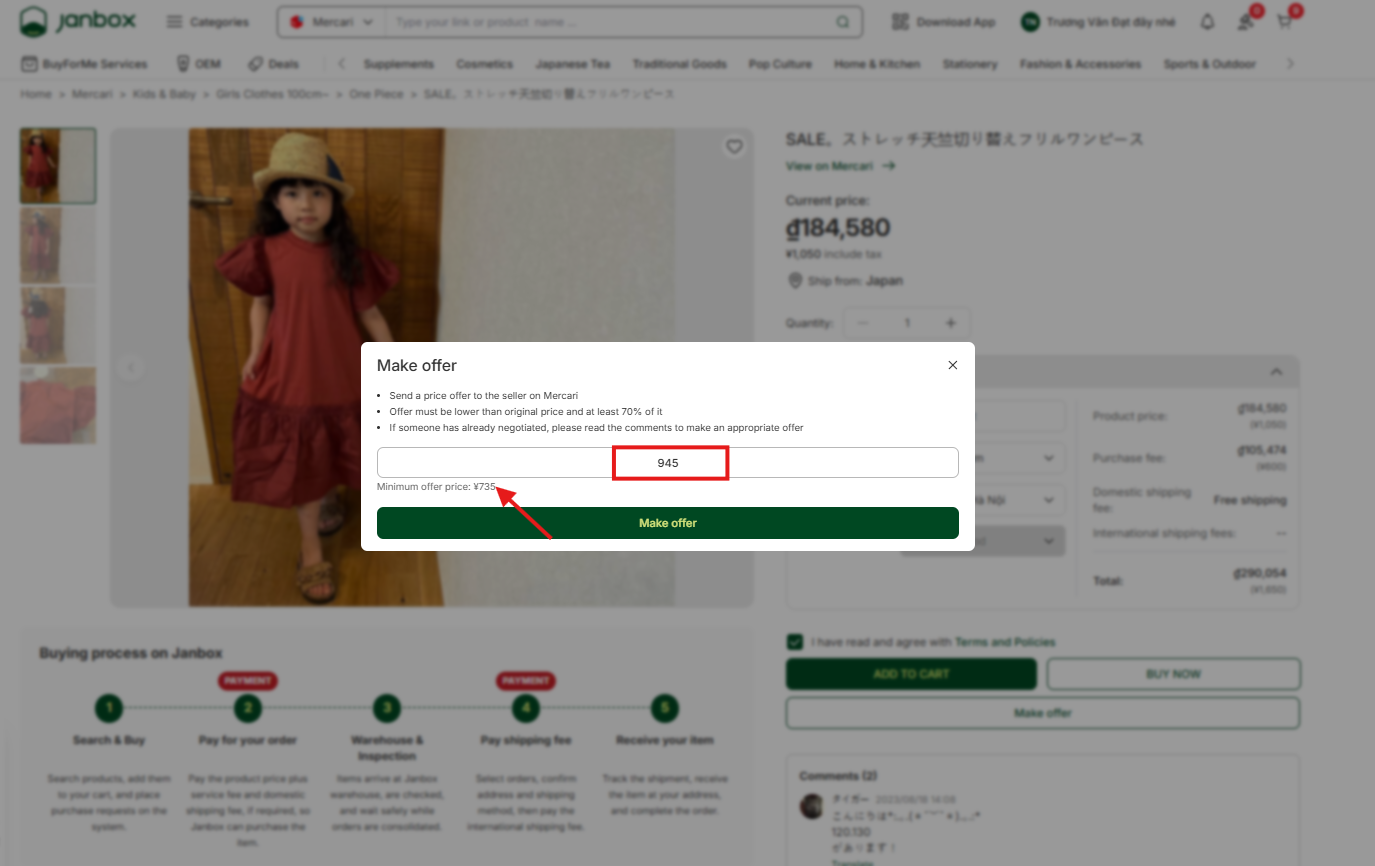
Janbox displays a suggested minimum price you can use when submitting an offer.
Step 5: Tap "Make Offer" to Submit Your Request
Review the product details and your proposed price.
Tap Make Offer for Janbox to send your request to the seller on Mercari.
Step 6: Wait for the Seller's Response
Once your offer has been submitted:The seller will review your offer.
If your offer is accepted: the seller will update the order price, and Janbox will automatically purchase the item on your behalf — no further action needed from you.
If your offer is declined: the item is sold at a higher price than what you offered.
You can view your offer history under the Bidding & Offers section.