How to Shop from Japanese Websites and Popular Marketplaces (Rakuten, Mercari, JDirectItems Shopping) via Janbox
How to Shop from Japanese Websites and Popular Marketplaces (Rakuten, Mercari, JDirectItems Shopping) via Janbox
To shop for items from Japanese websites and e-commerce platforms, simply follow this 3-step process:
Step 1: Search for a Product
You can search for the item you want using one of the following 3 methods:
Method 1: Enter the product name or keyword directly into the search bar on Janbox.
Method 2: Copy the product link from the original site (Rakuten, Mercari, JDirectItems Shopping, etc.) and paste it into Janbox's search bar.
Method 3: Select the marketplace's logo (Rakuten, Mercari, JDirectItems Shopping, etc.) directly on the Janbox interface and browse by product category.
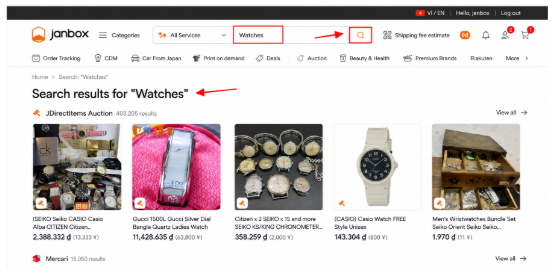
Step 2: Check Product DetailsTap on the product you want to purchase.
Carefully check the details: variant options (color, size, capacity, etc.), quantity, and make sure the item is marked as In Stock.
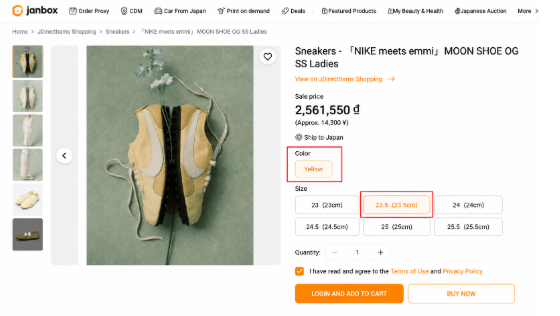
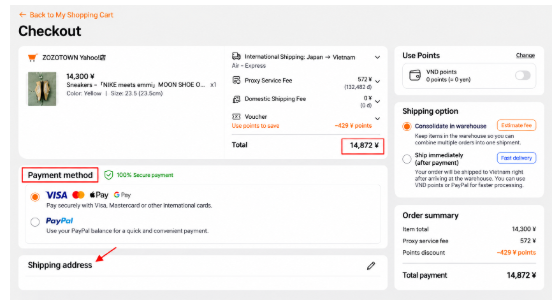
Step 3: Place Your Order and Pay
Select Buy Now (to check out immediately) or Add to Cart (to combine multiple items into a single order).
Review your order details, then complete payment on the Janbox app.