Payment Methods
Payment Methods on Janbox
Janbox supports multiple payment methods to help users complete purchases and auction payments conveniently and securely.
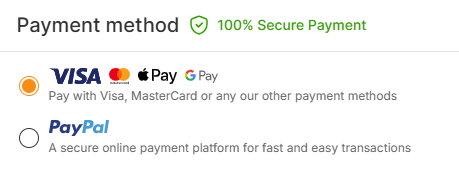
Currently, Janbox accepts the following payment methods:
PayPal
Airwallet
“My Point” Wallet
This guide explains how each payment method works and how to choose the most suitable option for your orders.
PayPal
PayPal is one of the most commonly used international payment methods on Janbox.
By connecting your PayPal account, you can quickly complete payments for purchases, auction orders, and shipping fees.
Benefits of using PayPal
Fast and secure payment process
Supports international transactions
Buyer protection support through PayPal
Convenient for users with linked bank accounts or cards
Important notes
PayPal transaction fees may apply depending on your region
Currency conversion rates are determined by PayPal
Some countries or accounts may have payment restrictions
Airwallet
Airwallet is a flexible payment gateway that allows users to pay directly using their payment cards or mobile wallets.
With Airwallet, you can:
Add credit or debit cards
Link Apple Pay
Link Google Pay
Complete payments securely through supported payment methods
Supported payment options
Visa
Mastercard
Apple Pay
Google Pay
Other supported card providers, depending on your region
Benefits of using Airwallet
Quick checkout process
Convenient mobile payment support
Secure card payment system
No need to preload balance before payment
Important notes
Supported payment methods may vary by country or device
Your bank may apply additional international transaction fees
Payment authorization depends on your card provider
My Point Wallet
My Point Wallet is Janbox’s internal wallet system that allows users to preload funds into their account balance and use points for payments.
Instead of paying for each order individually, users can top up their wallet balance in advance and complete transactions using available points.
How My Point Wallet works
Add funds to your My Point Wallet
Receive points in your Janbox account balance
Use points to pay for orders, bids, and shipping fees
Benefits of using My Point Wallet
Faster checkout process
Easy balance management
Convenient for frequent buyers
Reduces the need for repeated card payments
Important notes
Wallet balance must be sufficient before payment
Top-up processing times may vary depending on payment method
Wallet funds may not be refundable in certain cases
How to Choose a Payment Method
The best payment method depends on your shopping preferences and payment habits.
Payment Method | Best For |
PayPal | Users who prefer international online payments |
Airwallet | Users who want to pay directly with cards, Apple Pay, or Google Pay |
My Point Wallet | Frequent buyers who prefer prepaid balance management |
Frequently Asked Questions
Can I use multiple payment methods on Janbox?
Yes. You can choose different payment methods for different orders depending on availability.
Does Janbox store my card information?
Payment processing security depends on the selected payment provider. Sensitive payment information is handled through secure payment gateways.
Can I use Apple Pay or Google Pay?
Yes. Apple Pay and Google Pay are supported through Airwallet on compatible devices and browsers.
How do I top up My Point Wallet?
You can add funds to your wallet through the available top-up methods in your Janbox account.
Are there additional payment fees?
Some payment providers or banks may apply transaction or currency conversion fees depending on your region and payment method.
Last updated: 2026-05-15T04:54:31.608Z